Free beta · Living AI knowledge bases · No credit card
Build living AI knowledge bases from the sources you follow.
Connect the sources you rely on once. Keldura keeps supported sources current, organizes them into cited Libraries, and turns new knowledge into answers, Briefings, and Bots you can share.
Bring mixed sources into one Library in a single import flow.
Explore bulk importProduct preview
Preview the Keldura workflow.
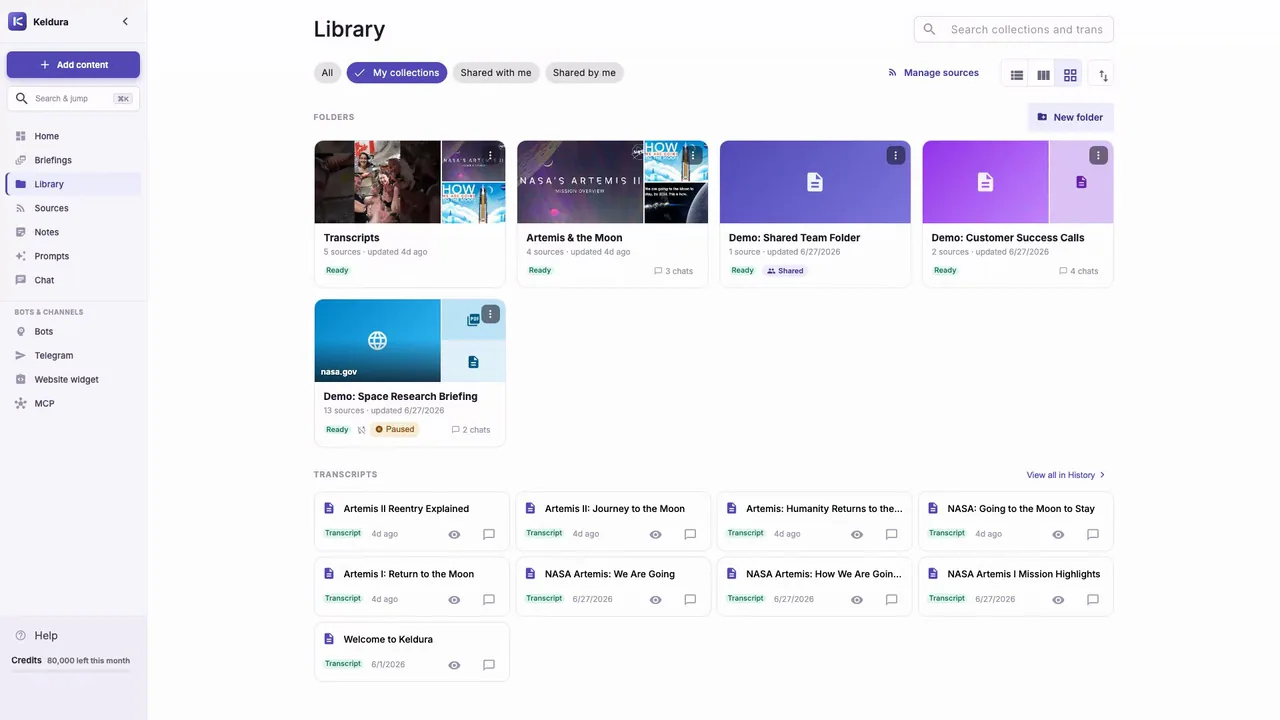
This current product preview shows the living knowledge loop: add content, review source activity, ask cited questions, and return as the Library grows.
- Bring mixed sources into one cited Library.
- Keep supported sources current instead of rebuilding the collection.
- Turn grounded knowledge into answers, Briefings, and reusable Bots.
One Library, many source types
Connect recurring sources once.
Start with the material you already follow. Keldura routes each source through transcription, document extraction, or OCR so spoken and visible knowledge can live together.
- Bulk import: YouTube channels and playlists, websites, local video and audio, PDFs, Word, PowerPoint, images, and text.
- Visible text from video: extract words shown on slides, whiteboards, and diagrams, not only the audio track.
- Instagram: bring reels and video posts into the same searchable Library.
- Telegram Import Bot: forward messages and files or bind a group for new messages.
- Google Drive: connect documents without downloading and re-uploading them first.
Living, not one-off
Keep knowledge current while you work.
A Library is more useful when it changes with its sources. Keldura can keep supported YouTube channels, playlists, and websites in sync, then surface what changed through source-linked Briefings.
- Auto-sync: schedule supported channel, playlist, and website imports so new items join the Library over time.
- Briefings: receive scheduled digests grounded in monitored sources; the free tier includes one per day across up to five monitored sources.
Grounded answers
Ask questions you can verify.
Pick a Library and ask across the sources inside. Answers carry inspectable citations and timestamps where available, while suggested questions and reusable prompts help you move from import to useful analysis.
- Cited answers that lead back to the source material
- Suggested questions based on the Library
- Saved prompts and shared prompt groups for repeatable work
From knowledge to action
Use the same Library wherever the work happens.
Bots and channels
Define one reusable Bot with folders, prompts, and a model, then connect it to a website widget or Telegram on eligible plans.
Sharing with access control
Share folders and prompt groups with read or write access, then revoke access when the work changes.
A dashboard for returning work
Resume recent Libraries, see source activity, and start with suggested questions instead of searching for where you left off.
Developer API
Build scripts and product workflows with documented API endpoints on eligible plans. Read the API docs.
Portable by design
Export transcripts, summaries, and metadata, with transparent credit costs before more work runs.
Compare before you choose
How Keldura compares
Start with the tool or job you are evaluating. Each guide leads with Keldura's strengths and keeps the competitor's real advantages visible.
Keldura vs. NotebookLM
Compare cited Libraries, recurring-source sync, sharing, and notebook research outputs.
Read the NotebookLM comparisonKeldura vs. ChatGPT Projects
Compare source-backed Libraries with a general-purpose project workspace inside ChatGPT.
Read the ChatGPT Projects comparisonKeldura vs. Chatbase
Compare direct Library work and reusable Bots with customer-support agent operations.
Read the Chatbase comparisonProduced by Keldura today
See the living knowledge loop before you sign up.
Keldura Daily is a public, no-account demonstration: current source updates become browsable, source-linked Briefings.
Why the name
Keldura, from kelda.
Kelda is Old Norse for a spring or well: a source that keeps flowing. The K-Spring mark pairs a well shaft with outward ripples, because in a living knowledge base, everything flows from the source.
Popular workflows
Start with the source or outcome you already have.
Every feature, in one place
The story above shows the complete Keldura positioning. This table provides the capability-level detail.
| Feature | What it is | How it benefits you |
|---|---|---|
| Multi-source connect | Bring in YouTube, Instagram, websites, local video and audio, Google Drive documents, images, PDFs, Word docs, PowerPoint files, text, and Telegram via the Telegram Import Bot. | Start from the sources you already follow instead of converting everything first. |
| Video channel and playlist import | Paste a YouTube playlist or channel URL and pull every video into one folder. | Build a searchable corpus from a whole video source in one job. |
| Import auto-sync | Keep supported YouTube channel, playlist, and website imports current on a schedule so new items join the Library over time. | Libraries stay up to date without re-pasting the same source URL for every update. |
| Video visual-text extraction | Sample video frames and extract visible text from slides, whiteboards, and diagrams with OCR. | Search and ask about information that was shown on screen, not only spoken aloud. |
| Website import | Crawl a domain or sitemap and turn every page into searchable text; enable auto-sync on supported website imports to pick up changes over time. | Turn docs, blogs, and knowledge bases into material your team can keep asking about as they update. |
| Local file and folder upload | Drag-and-drop audio, video, images, PDFs, Word documents, text files, or a whole folder. | Bring legacy recordings and documents into the same Library. |
| Library collections | Organize connected material into folders with counts, search, and quick actions. | Give every source a durable home before asking questions or sharing access. |
| Cited Chat | Ask questions across one or more Library folders and inspect citations from the source material. | Get answers you can verify instead of ungrounded summaries. |
| Suggested questions | Use source-aware prompts to start useful analysis quickly. | Move from connect to insight without designing every question from scratch. |
| Briefings | Turn updates from monitored sources into scheduled, source-linked digests; the free tier includes one per day across up to five monitored sources. | Keep up with changing sources without reopening every item manually. |
| Keldura Daily | Browse public AI research and creator economy briefings without an account. | See a live, source-linked demonstration before connecting your own sources. |
| Reusable Bots | Define a Bot once with folders, prompts, and model settings. | Reuse the same knowledge behavior and prepare it for publishing where eligible. |
| Telegram Import | Forward or send messages and files to the Telegram Import Bot, or bind a group so new messages land in a Library folder (per-file size limits apply). | Bring chat and shared files into the same cited Library without re-uploading in the browser. |
| Bot channels | Connect an eligible Bot to a website widget or Telegram so people can ask the Library where they already work. | Publish one reusable Bot through multiple channels without duplicating its folders, prompts, or model. |
| MCP agent access | Expose Keldura knowledge to MCP-capable tools on eligible plans. | Let AI tools work with your folders on plans where this access is available. |
| Developer API | Use API keys and REST docs for folders, prompts, documents, chats, messages, and limits on eligible plans. | Build scripts, dashboards, and product workflows on top of Keldura data. |
| Saved prompts | Keep reusable prompt libraries and apply them in folder chat; share prompt groups with teammates. | Run the same analyses consistently across teams and collections. |
| Translation and summaries | Translate transcripts and generate summaries for connected material. | Skim and understand long sources faster. |
| Layered document extraction | Use extraction engines and OCR for native documents, scans, and images. | Make messy PDFs and visual documents searchable. |
| Sharing controls | Share folders and prompt groups with read or write access by account, link, or token, with revocation. | Collaborate on Libraries and instructions without sending raw files around. |
| Home dashboard | Resume recent Libraries, see source activity, and start from suggested questions. | Return to active knowledge work without hunting through folders. |
| ZIP export | Bundle transcripts, summaries, and metadata into portable files. | Keep your knowledge portable and auditable. |
| Credit transparency | Review credit balance and model/source costs where available. | Understand usage as a transparent budget before running more work. |
| Progress streaming | Watch import and chat progress as work happens. | Know what is running without refreshing or guessing. |
| Soft-delete with undo | Use a short undo window on supported deletes. | Recover from accidental cleanup actions. |
| Free beta and demo entry | Try the product before committing to a paid workflow. | Evaluate the workspace with less setup risk. |
A simple living-knowledge loop
- 1
Connect
Add the sources and files you already follow.
- 2
Keep current
Auto-sync supported sources and organize them in Libraries.
- 3
Ask and act
Verify cited answers, read Briefings, and publish reusable Bots where eligible.
Pricing
Simple, transparent pricing.
Start on a free tier with no credit card. Keldura bills usage as transparent credits, so you can see what each action costs before it runs — and paid plans add higher limits, publishing, and developer API access.
- Free tier to start — no credit card
- Transparent credit costs before work runs
- Paid plans unlock publishing and the API
Questions, answered
Keldura is a living AI knowledge base workspace. Connect videos, documents, websites, and channels; auto-sync supported YouTube channels, playlists, and websites so Libraries stay current; organize them into shareable Library collections; ask cited questions with reusable or shared prompts; and prepare the same knowledge for publishing through Bots where eligible.
You connect the sources you follow — videos, podcasts, websites, PDFs, docs, and files — and keep supported YouTube channels, playlists, and websites auto-syncing so new items join the Library over time. They live together in an organized Library you can share, ask, and verify. The knowledge base grows with the material you bring in rather than being a one-off transcript.
Transcription is one step, not the product. Keldura turns mixed sources into searchable text and then organizes them into a cited knowledge base you can ask and verify. You can still paste a YouTube playlist or channel URL to bring videos in.
Keldura connects mixed sources — videos, podcasts, websites, PDFs, docs, and files — into organized Library collections you can share, auto-syncs supported channels, playlists, and websites, answers with inspectable citations and reusable prompts, and lets you define optional reusable Bots over that knowledge. Publishing a Bot is available on eligible paid or beta plans. Read the NotebookLM comparison
Keldura publishes honest, job-based guides for research, transcription, audience Bots, enterprise knowledge, and AI project workspaces. Browse all comparisons
You can define a reusable Bot over your Library and prepare the same source-backed knowledge for publishing where your plan is eligible. Publishing surfaces such as connecting a Bot to Telegram are available on eligible paid or beta plans.
Keldura supports YouTube playlists and channels, Instagram reels and video posts, Google Drive documents, local video and audio files, images, PDFs, Word documents, plain text, whole websites, and Telegram via the Telegram Import Bot (forward or send messages and files; bind a group for new messages; per-file size limits apply). Each item is routed to the best transcription or OCR provider automatically.
Yes. Link the Telegram Import Bot, then forward or send messages and files into a Library folder. You can also bind a group so new messages are imported. This is separate from connecting a knowledge Bot to Telegram for Q&A. Per-file size limits apply; use web import for larger audio or video files.
Yes. Open a folder and ask cited questions across the sources inside it, optionally with reusable prompts from your library or shared prompt groups. Answers include citations that point back to source material and timestamps where available.
You can start on a free tier with no credit card. Usage is billed as transparent credits, so you can see what each action costs before it runs, and paid plans add higher limits, publishing, and developer API access. See plans & pricing
Credits are a transparent usage budget. You can review your balance and the source and model costs before running work. See the credit costs page for details. View credit costs
Briefings turn updates from monitored sources into source-linked digests. Eligible accounts can schedule them, and the free tier includes one Briefing per day across up to five monitored sources.
A Bot is a reusable chatbot definition: the folders it can use, its prompts, and its model. Connect one Bot to channels such as a website widget or Telegram on eligible plans.
Developer API and MCP access are available on eligible plans, with documentation for folders, prompts, documents, chats, messages, rate limits, and API-key authentication.
Yes. Save prompts into reusable libraries and apply them in folder chat. Share prompt groups so teammates use the same instructions consistently.
Yes. Every folder can be exported as a ZIP containing transcripts, summaries, and metadata in plain formats.
Yes. Folders and prompt groups can be shared via link, email, or a public token. You can revoke access at any time.
Your transcripts and folders are private by default. You control what you share, with whom, and for how long.
No account is needed to browse Keldura Daily's public briefings. Sign up when you want to connect your own sources, keep a Library, and create private Briefings. Browse Keldura Daily
Start with one source and let the knowledge grow.
Free beta access. No credit card. Or browse public Briefings first, without an account.