
Living AI Library
Turn the sources you follow into a living AI Library.
Bring in the videos, podcasts, documents and websites you follow. Skim each as a cheatsheet, read Insights, and ask questions with cited answers.
Free plan · No credit card
How Keldura works
Bring sources
Add files, folders, websites, and video or podcast links.
Skim and read
Open a cheatsheet, read Insights, or search the full transcript.
Ask and stay current
Get answers with citations, and let Briefings bring in what is new.
Cheatsheets and Insights
Skim a cheatsheet. Read Insights when you want depth.
Turn any item in your Library into a one-page visual cheatsheet. Open Insights for the key points and chapters, or the transcript when a detail matters.
- One-page cheatsheets you can skim, save and share
- Insights and chapters on the same item
- The full transcript, searchable, when you need it
Bring your sources
Bring the sources you already follow.
Add files and whole folders, PDFs and Office documents, websites, and links to public videos and podcasts. Connect Google Drive or forward messages and files through Telegram. Keldura turns each one into searchable text in your Library.
- Audio, video, PDF, Word, PowerPoint, images and text
- Websites and public video and podcast links
- Google Drive documents and Telegram forwarding
Cited answers
Ask across your Library and check the sources.
Ask one question across a whole Library. When your sources cover it, the answer cites the passages it comes from — with timestamps for audio and video where available — and suggested questions help you start.
- Citations that open the exact source
- Suggested questions grounded in your Library
- Reusable prompts you can share with your team
Stay current
Briefings keep you current.
Follow the channels, playlists and sites that matter to you. Briefings summarize what is new with links back to every source. Save any item to your Library, or import and monitor a source to keep adding the new items each sync finds. Limits depend on your plan.
- Scheduled summaries of what is new
- Cheatsheets for new items when you ask for them
- Links back to every source
Publish and connect
Use the same Library wherever the work happens.
Bots and channels
Define a Bot once — its folders, prompts and model — and connect it to a website widget or Telegram on eligible plans.
Developer API and MCP
Work with your Library from scripts and AI tools on eligible plans.
Read the API docsSharing with access control
Share folders and prompt groups with read or write access, and revoke access any time.
Export any time
Download a folder and its direct subfolders as a ZIP of plain-text documents.
Keldura Daily
Recent cheatsheets from Keldura Daily.
A free public edition from sources Daily follows — the same cheatsheets you get from your own Library.
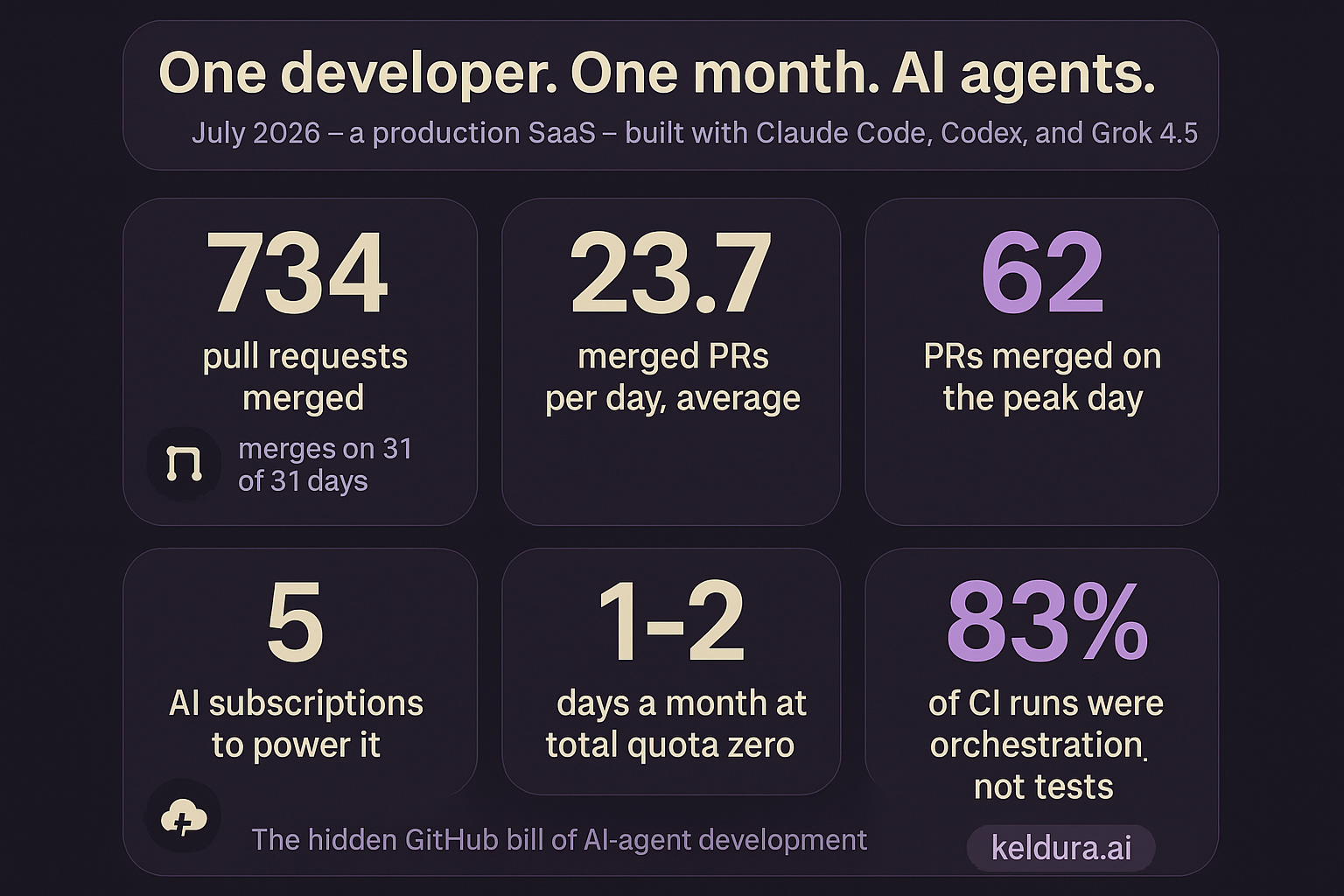
734 Pull Requests a Month with AI Agents: The Hidden GitHub Bill
Real numbers from building keldura.ai: what shipping ~24 PRs a day with AI agents does to your Actions invoice, your review-bot quotas, and your CI design.
Pricing
Start free. Paid plans are launching soon.
Paid plans, launching soon, will add higher usage, publishing and developer access. Usage is measured in credits, and you see what an action costs before it runs.
Questions, answered
Keldura turns the sources you follow — files, documents, websites, and video and podcast links — into a living AI Library. Skim each item as a cheatsheet, read Insights, and ask questions with cited answers. Briefings keep the Library current, and Bots let you publish it on eligible plans.
Audio and video files, PDFs, Word and PowerPoint documents, images and text; whole folders; websites; links to public videos and podcasts; Google Drive documents; and messages and files forwarded through Telegram. Only bring in content you own or have permission to use.
When your sources cover a question, the answer points to the passages it came from, with timestamps for audio and video where available, so you can check each claim.
Briefings summarize what is new in the sources you follow, on a schedule, with links back to each source; limits depend on your plan. Keldura Daily is a free public edition you can read without an account. Read Keldura Daily
Start on the free plan with no credit card. Paid plans, launching soon, will add higher usage, publishing and developer access. Usage is measured in credits, and you can see what an action costs before it runs. See plans and pricing
Your Library is private by default. You choose what to share, with whom, and for how long, and you can revoke access any time.
Yes. Download a folder and its direct subfolders as a ZIP of plain-text documents.
Paid plans are launching soon. Once they do, you will be able to cancel any time from your account, and a cancelled plan stays active until the end of the period you paid for. New subscriptions can be refunded within the window in our Refund Policy. Read the Refund Policy
Turn your sources into a Library you can skim, ask and share.
Start with a folder, a website or a playlist.